 Set as preferred source


Artificial Intelligence (AI) is rapidly becoming a prerequisite for survival in the new business reality. Using AI is no longer just a trend — it’s become the new standard for doing business.
In everyday operations, AI helps automate routine tasks (saving up to 30% of team time), process large volumes of data that would be too laborious to analyze manually, generate ideas, text, designs, or even code that shortens the product development cycle, and optimize costs through more accurate forecasting and decision-making.
Such changes not only speed up work — they change the logic of the organization itself: instead of focusing on processes, businesses can now focus on results. This is the key to business efficiency in the new environment. Gartner predicts up to 40% of enterprise applications will include integrated task-specific agents by 2026, up from less than 5% today.
What Is an AI Assistant for Business?
An AI assistant for business (also known as an enterprise AI assistant or business virtual assistant) is an intelligent digital system that supports a company’s daily operations by performing routine and complex tasks using artificial intelligence.
At its core, an AI Assistant combines:
- Natural Language Processing (NLP) - to understand and respond to human speech or text.
- Machine Learning (ML) - to learn from past interactions and improve over time.
- Automation and Integration Capabilities — to connect with tools like CRMs, ERPs, calendars, or communication platforms.
Using NLP and LLMs, AI assistants process human speech and text data to understand context and interpret user intent. Generative AI enables them to produce human-like responses, and ML algorithms allow them to learn from every user interaction and self-improve performance and accuracy over time.
The reason AI assistants are so valuable—particularly for enterprises—is that they’re collaborative.These digital assistants act as partners to enhance productivity by automating many complex tasks.
Unlike basic automation tools that only answer questions, advanced AI assistants engage users in natural, conversational language — understanding both text and voice commands while delivering instant, seamless task execution.
AI Assistant vs AI Agent
The terms AI Assistant and AI Agent are often used interchangeably, but they actually refer to different levels of intelligence, autonomy, and capability in AI systems.
| Feature | AI Assistant | AI Agent |
|---|---|---|
| Definition | A tool that helps users complete tasks by responding to commands or questions. | An autonomous system that can plan, make decisions, and execute actions toward a defined goal — often without direct user input. |
| Level of Autonomy | Reactive – waits for user instructions. | Proactive – acts independently based on goals, context, and feedback. |
| Primary Function | Assists humans with tasks like scheduling, writing, or summarizing. | Manages processes end-to-end, collaborating with other agents or systems to achieve outcomes. |
| Example Tasks | “Write me an email.” “Summarize this report.” “Book a meeting.” | “Find the best marketing channels for this product, run test ads, and report results.” |
| Context Awareness | Limited — understands the immediate context of the conversation or command. | Deep — maintains long-term memory, understands goals, and learns across interactions. |
| Integration | Connects to apps via prompts or APIs, often requiring manual setup. | Dynamically integrates and coordinates multiple tools, APIs, and even other agents. |
| Human Involvement | Human-in-the-loop — needs frequent user direction. | Semi- or fully autonomous — can operate with minimal supervision. |
| Examples | ChatGPT, Siri, Alexa, Google Assistant. | AutoGPT, OpenDevin, CrewAI, or custom multi-agent business systems. |
In simple terms:
- AI Assistants help you do tasks. Think of them as smart helpers that follow your instructions. They wait for your instructions — “Write me an email,” “Summarize this report,” “Book a meeting.” They make you faster and more efficient, but they’re reactive.
- AI Agents help you achieve goals. hey don’t just wait for you to ask — they figure out what needs to be done and act autonomously.
Assistants help you complete tasks; agents help you achieve goals.
Main Areas of AI Assistant Application
1. Customer Support & Service Automation
AI assistants can handle customer inquiries 24/7, resolve common issues, and escalate complex cases to human agents when needed.
Example: Chatbots and virtual agents providing real-time support, processing refunds, or managing FAQs for e-commerce and telecom companies.
2. Sales & Marketing Enablement
AI-powered assistants help teams qualify leads, personalize campaigns, and track engagement automatically.
Example: A sales assistant that updates your CRM, drafts outreach emails, and predicts which leads are most likely to convert.
3. Data Analysis & Business Intelligence
AI assistants can process massive data sets, summarize trends, and provide real-time insights through natural language queries.
Example: A financial analyst bot that answers, “What were our top-performing products last quarter?”
4. Human Resources & Recruitment
From screening resumes to scheduling interviews, AI assistants can streamline HR workflows and improve candidate experience.
Example: A recruiting assistant that ranks applicants based on skill match and availability.
5. IT Support & Operations
AI assistants can proactively detect issues, guide users through troubleshooting, or even resolve technical incidents autonomously.
Example: An internal IT bot that resets passwords, checks system status, and alerts teams about potential outages.
6. Finance & Accounting
AI assistants can automate repetitive financial tasks like invoice processing, expense management, and budget tracking.
Example: An accounting assistant that reconciles transactions or alerts teams about spending anomalies.
7. Healthcare & Life Sciences
In healthcare, AI assistants help manage patient data, schedule appointments, and support clinical decision-making.
Example: A virtual nurse that reminds patients to take medication or provides follow-up care instructions.
8. Enterprise Productivity & Knowledge Management
AI assistants act as digital coworkers, integrating with tools like Slack, Jira, or Notion to help teams find information faster and stay on track.
Example: An assistant that summarizes meeting notes, tracks project deadlines, and suggests next steps.
Benefits of Implementing an AI Assistant
- Higher productivity – routine tasks are automated, freeing time for strategic work.
- Cost savings – reduced need for manual labor or support resources.
- More effective decision-making – they can actually interpret data to provide useful business insights.
- Improved accuracy – fewer human errors in repetitive processes.
- 24/7 availability – consistent support regardless of time zone.
- Enhanced customer and employee experience – faster responses, more personalized service.
How to Build an AI Assistant for Your Business?
Building an AI assistant isn’t just about technology — it’s about aligning the solution with real business needs. With hands-on experience across multiple industries, we help companies turn their AI ideas into working, measurable results.
In general, the process of developing an AI Assistant involves: planning, design, and testing.
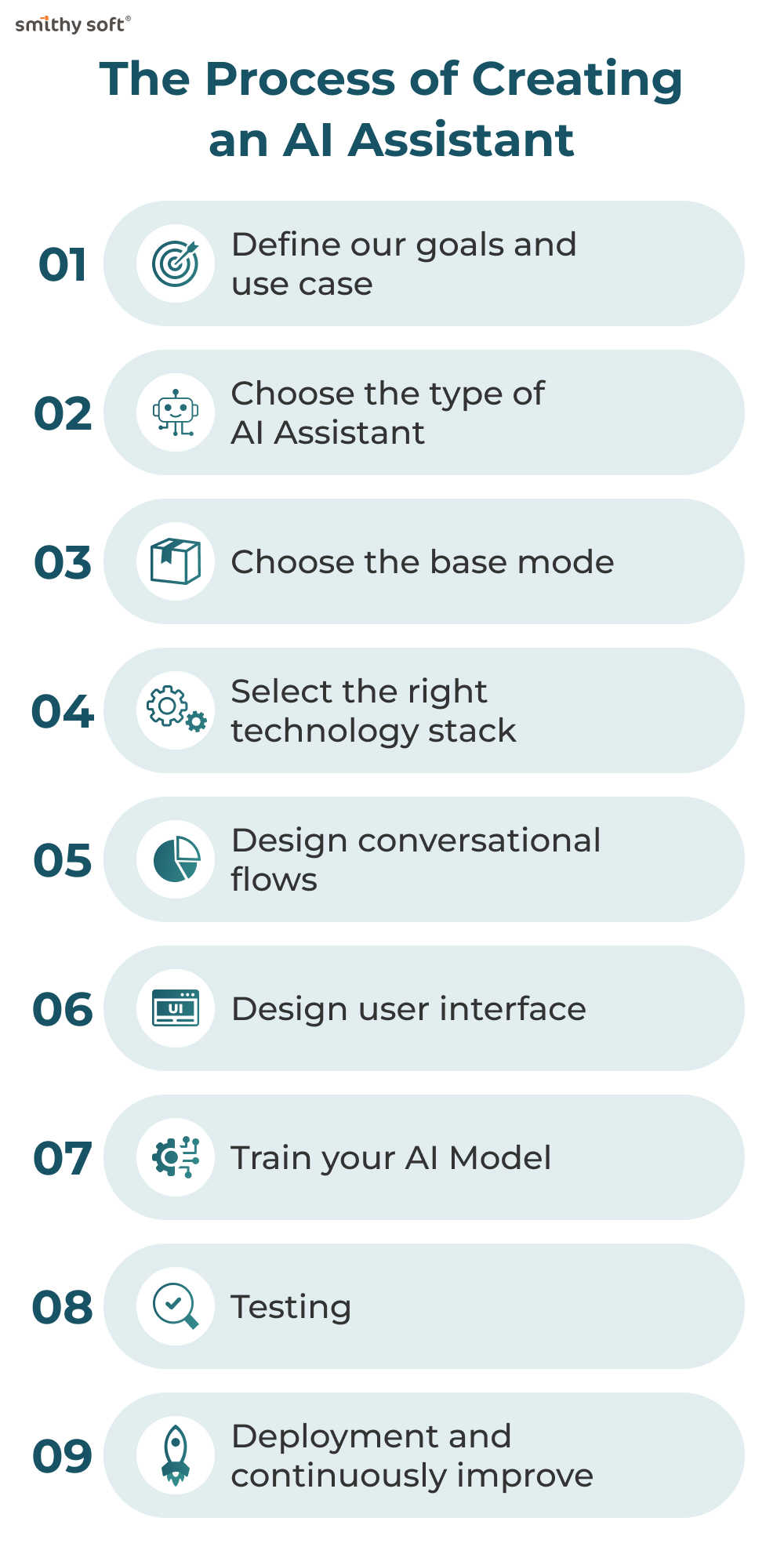
Building an AI assistant for your company isn’t just about adding a chatbot to your website - it’s about creating an intelligent digital partner:
- Define your goals and use case: before diving into development, identify why your business needs an AI assistant. Some questions you should ask yourself are: What tasks do I want my AI business assistant to perform? What specific problem should it solve? What are my target audience’s needs? What business goals will it support — sales, support, marketing, or HR automation? How complex and scalable should the system be?
- Choose the type of AI Assistant: rule-based assistants follow predefined decision trees and respond to specific keywords; conversational assistants use NLP and machine learning to understand intent and context; autonomous AI agents take actions, make decisions, and complete tasks across systems. For most companies, a conversational AI assistant offers the ideal balance between power and practicality.
- Choose the base model: the base model is the foundation of your AI assistant and determines its core capabilities.
- Select the right technology stack: you’ll need a combination of tools and technologies to bring your AI assistant to life:
- NLP Engine: OpenAI GPT, Google Dialogflow, Rasa, or Amazon Lex.
- Frontend/UI: Web, mobile, or chat integration (Messenger, Slack, WhatsApp, etc.).
- Backend: Node.js, Python, or cloud services for processing and data handling.
- Integrations: APIs connecting to your CRM, ERP, email, or ticketing systems.
If you’re building a scalable, enterprise-level assistant, consider cloud platforms like AWS, Azure, or Google Cloud AI for hosting and managing your AI workloads.
- Design conversational flows— this is the heart of user experience. Plan the main conversation paths, fallback scenarios, and the assistant’s tone. Good design ensures users always feel guided, not lost.
- Design the user interface: creating a user-friendly system improves the overall experience. Your AI assistant should have a clear and intuitive design that helps guide users easily throughout their journey.
- Train your AI model: next comes the training phase - feeding the assistant examples of real-world questions, commands, and expected responses. You’ll define intents, entities, and training phrases to help your assistant understand natural human language. For GPT-based models, you can fine-tune with custom prompts, datasets, or contextual rules relevant to your domain. The richer the data, the smarter your assistant becomes.
- Testing: before launch, perform extensive testing to validate accuracy, performance, and security:
- check NLP understanding (how well it catches intent)
- test integrations for real data handling
- add authentication where sensitive data is involved
- include beta testers from your real user base — they’ll expose edge cases your team might miss. - Deploy and continuously improve: once the AI assistant is installed, your customers can start interacting with it. Keep in mind that although testing has already been performed, continuous monitoring helps identify areas for improvement over time.
Examples of AI Assistant Use in Business
Millions of people around the world use personal AI assistants like Apple’s Siri, Amazon’s Alexa, and Google Assistant to create shopping lists, get important reminders, and even manage smart home automations. On your computer, tools like ChatGPT or Google’s Gemini help you write emails, manage your calendar, and turn long, dry documents into succinct summaries. AI assistants are quickly gaining popularity in the workplace, especially at the enterprise level.
AI assistants have practical applications across nearly every business function. Here are some of the most impactful ways companies use them.
AI assistants play a key role in human resources (HR) process automation by improving employee experiences and streamlining administrative tasks. They answer patient questions in real-time, assist with appointment scheduling, billing and prescription refills and provide self-service access to medical records. Many organizations use AI assistants internally to streamline processes such as onboarding, scheduling, and handling employee inquiries. Example: Cleo and Leena AI assist HR teams by managing FAQs, tracking requests, and guiding employees through company policies.
IT departments typically face overwhelming ticket volumes for routine requests like password resets, software installations, and connectivity issues. AI assistants can: automatically resolve many routine IT tickets without human intervention, route complex issues to the appropriate specialist with relevant context, guide users through basic troubleshooting steps, monitor system health and proactively alert for potential problems.
Data Analysis & Decision Support: modern AI assistants help managers interpret data, predict trends, and make smarter business decisions. Example: Financial platforms integrate AI assistants to summarize reports, monitor KPIs, and recommend strategic actions.
Customer Support Automation - AI Assistants can handle repetitive customer queries, provide instant responses, and escalate complex issues to human agents. This reduces response time and improves client satisfaction. Example: Companies like Zendesk and Intercom use AI-driven virtual assistants to automate up to 70% of support interactions.
Sales and Lead Generation: AI assistants help sales teams qualify leads, schedule meetings, and even conduct personalized outreach. Example: Tools such as Drift or HubSpot AI use predictive algorithms to identify high-potential prospects and automate follow-ups.
Marketing and Content Creation: AI assistants can generate content, analyze campaign data, and optimize marketing strategies in real time. Example: Jasper AI or ChatGPT help marketing teams craft blog posts, ad copy, and email campaigns efficiently and consistently.
More examples of useful AI assistants for business (by Moveworks):
Microsoft Copilot—for Microsoft applications: for organizations heavily invested in the Microsoft ecosystem, Copilot provides AI assistance directly integrated with Office 365, Teams, and other Microsoft tools. The solution makes it easier for employees to work more efficiently using the Microsoft applications they already know.
Moveworks - for employee support: Moveworks delivers a powerful agentic AI Assistant designed to automate and elevate employee support across all your departments. The platform integrates with workplace collaboration tools like Microsoft Teams and Slack to provide employees with a single interface for all support needs - all within applications that your team is already using.
Gong - for sales: Gong's AI assistant specializes in sales intelligence and coaching. By reviewing and analyzing customer interactions, the platform helps sales teams understand what approaches work best and provides guidance for improving performance. The system automatically records, transcribes, and analyzes sales calls to identify patterns in successful deals.
Jasper - for AI writing: Jasper makes content creation easy, helping marketing teams quickly draft blog posts, social media content, ads, and more. It blends AI writing tools with brand voice controls to keep everything consistent.
Fireflies - for meetings: Fireflies focuses exclusively on making meetings more productive through AI-powered transcription, summarization, and insight generation. The tool integrates with popular video conferencing platforms to automatically capture meeting content and convert conversations into searchable, shareable meeting notes.
Zendesk - for customer support: Zendesk's AI assistant enhances customer support operations by automating responses to common inquiries and helping agents resolve issues more efficiently. The solution integrates with Zendesk's overarching customer service platform to provide context-aware assistance.
Motion - for project management: Motion brings AI assistance to project management, helping teams plan work, allocate resources, automate to-do lists, and adapt to changing priorities. The platform automatically schedules tasks based on deadlines, dependencies, and team availability.
Challenges and Limitations of AI Assistants
1. Data Privacy and Security Risks
AI assistants often handle personal data, and inadequate security can result in leaks or misuse — especially in healthcare and business contexts. According to the AI Threat Landscape Report 2024 by HiddenLayer, 77% of organizations experienced AI-related security breaches last year. Even more alarming, internal business information was the most common type of sensitive data leaked into GenAI systems, with 43% of breaches involving critical business plans, product data, or customer information according to LayerX.
2. Outdated or Incomplete Data
Many AI systems rely on pre-trained information. If the data is outdated or incomplete, responses may be inaccurate or irrelevant.
3. Limited Understanding of Context
AI can analyze large amounts of data and answer straightforward questions, but it struggles with understanding the nuances of human language. Sarcasm, humor, cultural differences, and ambiguous expressions can lead to incorrect or inappropriate responses.
4. Lack of True Understanding
AI assistants operate on algorithms and statistical models, not consciousness or emotions. They can generate logical answers but lack deep reasoning and genuine empathy.
5. Integration with Legacy Systems
Many companies still rely on legacy systems that are outdated, fragmented, or not designed to integrate with modern AI technologies. This poses a significant hurdle when deploying an AI-driven business assistant for knowledge sharing. For example, if your AI assistant needs to pull data from an old system, but that system doesn’t support modern APIs or has fragmented data, the assistant won’t be able to retrieve the information accurately.
6. Technical Limitations
AI assistants require significant computational resources, may experience latency, and are not always easy to integrate with other systems.
7. Legal and Ethical Challenges
AI use is subject to evolving regulations. Issues like copyright, liability for errors, and ethical dilemmas remain important concerns.
And finally—risk of over-reliance: excessive trust in AI can reduce human critical thinking, problem-solving, and decision-making skills.
Conclusions
An AI assistant isn’t a one-time project—it’s a strategic investment that evolves with your business. When built thoughtfully, it becomes your digital teammate - answering questions, completing tasks, and optimizing operations around the clock.
Whether you’re a startup building efficiency from the ground up or an enterprise scaling customer experience, the key to success lies in aligning AI technology with real business value.
An AI assistant is much more than a chatbot — it’s a living ecosystem that brings together AI models, data integration, and user-centered design. At SmithySoft, we know how to turn that vision into a practical, reliable solution. Explore our AI Assistant development capabilities.